

I was challenged to design a highly scalable architecture on Kubernetes and AWS that included deploying an LLM on a GPU.
That assignment pushed me outside my usual comfort zone. I’m used to shipping services that mostly compete for CPU, memory, and storage — but I’d never had to operationalize a large model on AWS, think through GPU scheduling, and deal with the realities of heavyweight model artifacts.
In this lab, the “LLM” workload isn’t a classic Transformer stack — it’s cartesia-ai/Llamba-3B, a Mamba-2 State Space Model (SSM) served behind a small FastAPI service. The system is deployed to AWS EKS, exposed via an ALB Ingress, and provisioned end-to-end with Terraform.
Serving massive LLMs on a GPU
In this lab, I kept the GPU story intentionally simple (a single GPU node group + one inference pod requesting nvidia.com/gpu: 1). But it’s useful to know the main strategies you’ll run into when a model no longer fits comfortably on one device, or when you need higher throughput than a single GPU can deliver.
Below is a quick map of the main approaches and the papers that shaped them.
Note: Kubernetes can schedule GPUs (and you can request multiple GPUs per pod), but model parallelism typically runs during inference. In practice, you usually implement these strategies by using a serving/runtime framework that implements the sharding and collective communication logic (e.g., vLLM, DeepSpeed Inference, or TensorRT-LLM).
Pipeline parallelism
Split the model layers into stages, place each stage on a different device, and stream micro-batches through the pipeline to keep all GPUs busy.
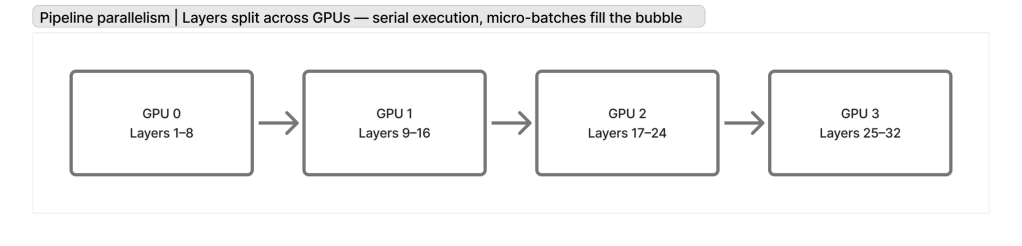
Reference: GPipe — Huang et al., 2019 (Google Brain)
https://arxiv.org/abs/1811.06965
Tensor parallelism
Shard large matrix multiplications (e.g., attention/MLP weights) across GPUs so each device holds only a slice of the tensors; combine results via collectives.
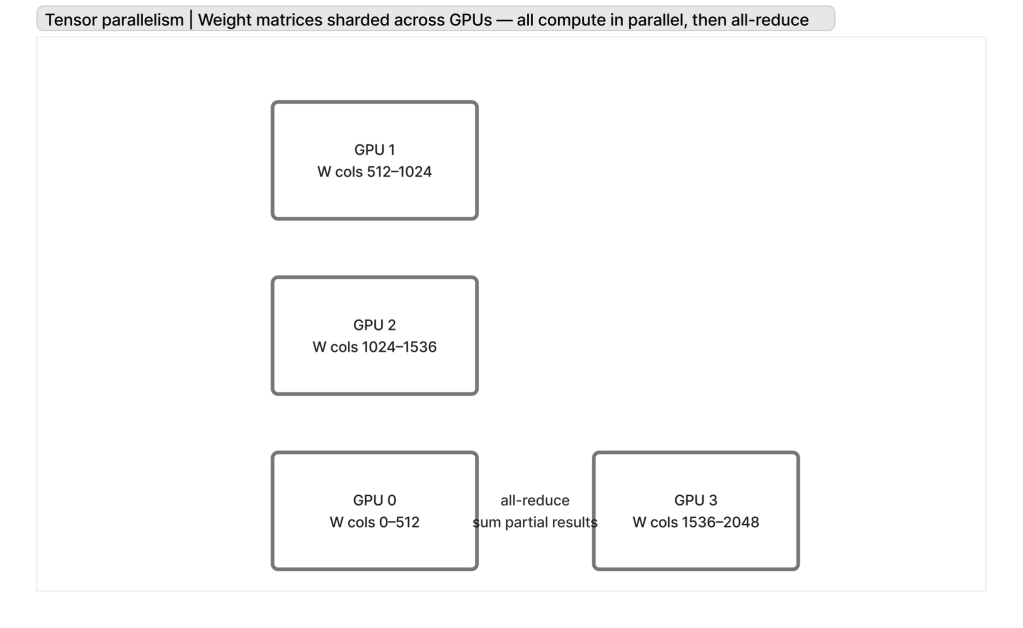
Reference: Megatron-LM v1 — Shoeybi et al., 2019 (NVIDIA)
https://arxiv.org/abs/1909.08053
Data Parallelism
This is your traditional horizontal scaling: multiple nodes with GPUs, each behind a load balancer, handling part of the traffic.
3D parallelism (tensor + pipeline + data combined)
Combine tensor parallelism, pipeline parallelism, and data parallelism (1 llm horizontally scaled) to scale to very large models and very large clusters.
Reference: Megatron-LM v2 — Narayanan et al., 2021 (NVIDIA)
https://arxiv.org/abs/2104.04473
Expert parallelism / Mixture-of-Experts (MoE)
Route each token to a subset of “expert” sub-networks. This increases parameter count without making every token pay the full compute cost, at the expense of more complex routing + capacity planning.
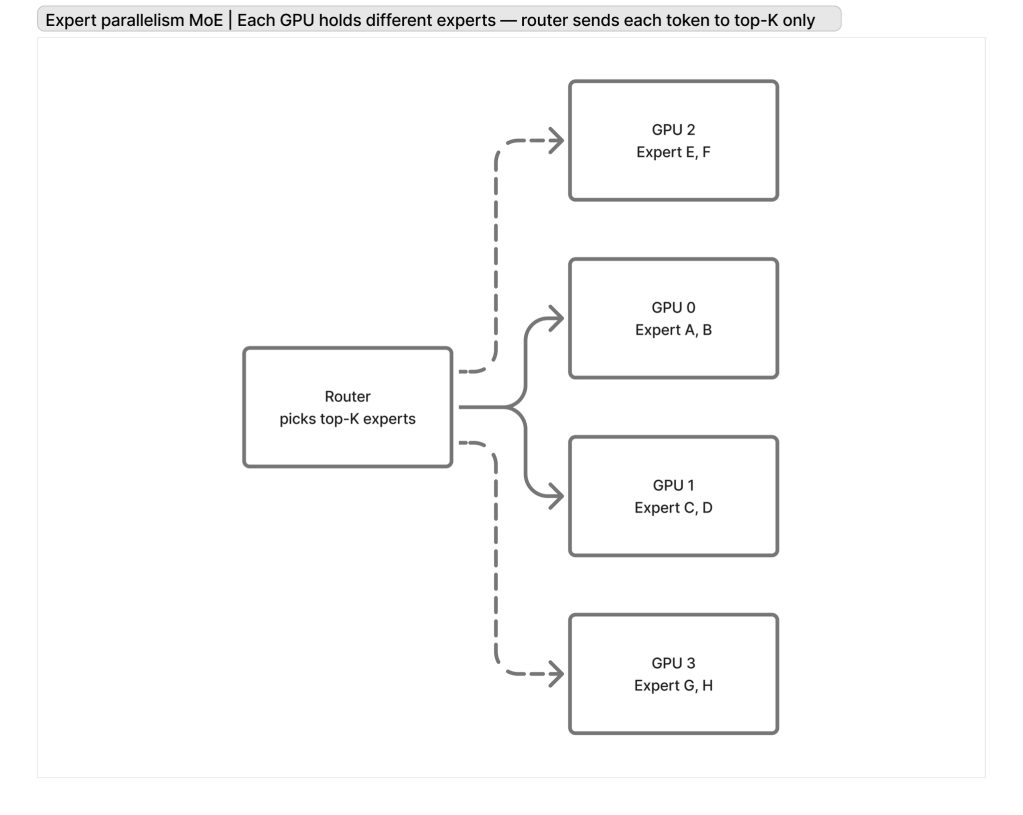
Reference: Switch Transformers — Fedus, Zoph, Shazeer, 2021 (Google)
https://arxiv.org/abs/2101.03961
Inference serving / KV cache efficiency
When serving, memory pressure and bandwidth often come from the KV cache. Techniques like paged attention reduce fragmentation and improve utilization under high concurrency.
Reference: vLLM / PagedAttention — Kwon et al., 2023 (UC Berkeley)
https://arxiv.org/abs/2309.06180
Designing The Pods
When I started sketching the Kubernetes side, I made two early decisions that impact scale, deployment velocity, and operational ergonomics.
Split the LLM into an independent service
Instead of embedding any special business logic alongside inference, I deployed the model behind its own llm-service with a general-purpose API.
The goal was to make scaling a deployment concern, not an application rewrite:
- If throughput becomes the bottleneck, I can scale the
llm-servicereplicas horizontally (within the limits of GPU capacity). - The chatbot tier can scale independently based on HTTP traffic.
- It keeps the model runtime isolated: GPU nodes, CUDA/CUDNN dependencies, and failure modes are contained to the inference tier.
- I can use the model for other purposes in the future.
This is the simplest form of scaling for inference: multiple identical model replicas handling different requests in parallel (“data scaling”).
Don’t bake model weights into the Docker image
Even though I didn’t fully explore all the optimizations in this lab, I decided to avoid bundling model weights in the container image.
Instead, I mounted a volume for the model cache and had the pod download weights during startup.
Tradeoffs:
- You pay a cold-start cost (download time) and, potentially, egress depending on where the artifacts live.
- In return, you keep the Docker image smaller and faster to ship/pull, which makes rollouts and horizontal scaling easier.
- A persistent volume also lets you retain the cache across restarts on the same node, so subsequent startups can be much faster.
Designing the deployment
The next big design choice was how to run GPU capacity in the cluster without letting “normal” workloads leak onto expensive nodes.
Separate node group (auto-scaling group) for GPU instances
In Terraform, I provisioned a dedicated EKS-managed node group for GPUs (g5.xlarge) alongside the regular application node group (t3.medium). This effectively gives you a separate auto scaling group for GPU capacity:
eks_managed_node_groups = { app-nodes = { instance_types = ["t3.medium"] labels = { role = "app-nodes" } } gpu-nodes = { instance_types = ["g5.xlarge"] ami_type = "AL2_x86_64_GPU" min_size = 0 max_size = 2 desired_size = 1 labels = { role = "gpu-nodes" } taints = [{ key = "nvidia.com/gpu", value = "true", effect = "NO_SCHEDULE" }] }}
Two key details here:
- The label (
role = gpu-nodes) gives me a clean selector target from Kubernetes manifests. - The taint (
nvidia.com/gpu=true:NoSchedule) is the guardrail: by default, nothing can land on GPU nodes.
Only GPU pods can land on GPU nodes
On the Kubernetes side, the llm-service deployment is explicitly configured to:
- Select the GPU node group
- Tolerate the GPU taint
- Request an actual GPU resource (
nvidia.com/gpu: 1)
From k8s/llm-deployment.yaml.template:
spec: nodeSelector: role: gpu-nodes tolerations: - key: "nvidia.com/gpu" operator: "Exists" effect: "NoSchedule" containers: - name: llm-service resources: requests: nvidia.com/gpu: "1" limits: nvidia.com/gpu: "1"
This combination is what makes the isolation work in practice:
- CPU-only pods don’t have the toleration, so they’ll never schedule onto GPU nodes.
- The only pods that can land there are the ones that both tolerate the taint and (in this case) explicitly request the GPU.
Sizing
Sizing GPU inference is mostly a memory accounting exercise.
At a high level, the GPU VRAM budget is split into:
- Static model footprint: weights (plus any quantization format overhead), and framework/runtime allocations.
- Per-request / per-batch tensors: activations, temporary buffers, and most importantly (for Transformers) the KV cache.
The practical workflow I used is:
1) Start with the VRAM you actually have
On AWS g5.xlarge (NVIDIA A10G) You get 24 GiB of VRAM, but you should not plan to use 100% of it.
2) Subtract the static allocations
Load the model and measure the remaining VRAM after initialization. This is your headroom for inference-time tensors.
This is where the details of tensor shapes matter: dtypes (bf16/fp16/int8), any attention implementation, and whether you’re holding extra buffers for compilation/caching.
3) Estimate the per-request tensor cost → derive max concurrency
Once you know how much memory one request (or one batch element) needs, you can derive a hard upper bound for concurrency:
max_concurrent_requests ≈ floor((free_vram_after_model – safety_margin) / vram_per_request)
This gives you the “hard stop” threshold where CUDA will OOM.
4) Tie it back to load + autoscaling
That concurrency number links GPU sizing to expected load.
5) Plan GPU capacity like a supply problem (warm nodes for peak)
The other part of sizing is figuring out how many GPUs you need in the fleet — and this is not purely a math exercise.
In practice, you’re not guaranteed to be able to provision GPUs exactly when you want them (or at all). Even if Kubernetes HPA wants to scale out, the underlying GPU node group still has to successfully launch instances, join the cluster, pull images, and warm up the model.
That means for a predictable peak load, you often need to keep some GPU capacity “warm” (nodes already running and ready), which can get expensive very quickly.
If a single GPU can safely sustain N concurrent requests, and your expected peak requires (say) 10× that, you either:
- scale horizontally (more GPU replicas / more GPU nodes), and/or
- reduce per-request memory (shorter context, batching strategy, quantization, KV cache optimizations like PagedAttention), and/or
- move to model parallelism if the model doesn’t fit on one device.
In practice, I treat “CUDA OOM” as a sizing failure mode: you want enough headroom that traffic bursts don’t push you over the edge.
Conclusion
Deploying models in production is challenging, and it takes careful thinking through what’s going on to make the right decisions.
Please check out my lab:
https://github.com/juancavallotti/k8s-ssm
I tried it with Cartesia’s model because I was test-driving SSMs — but the LLM pod can easily be configured to run Llama, DeepSeek, or Qwen if you want a tool-calling-capable Transformer model.
Good Luck!
 Juan Alberto López Cavallotti
Leave a comment