
I’ve been building mobile apps that leverage LLMs for almost four years now. Over that time, I’ve learned (often the hard way) where the real challenges show up—especially when you’re trying to build copilots.
Why copilots? A phone is a small device, and we spend a huge portion of our time texting on it. It’s only natural to try to accomplish work by typing a request—rather than hunting through intricately designed UX flows.
But “mobile copilot” is a deceptively hard problem. On the one hand, your tools often include front-end capabilities and access to privileged, high-context signals: the user’s location, local notifications, on-device databases, contacts, sensors, and more. On the other hand, mobile is a hostile, slow-moving environment: you can’t truly trust secrets on-device, and iteration is inherently slower because your entire installed base must consume an update.
That tension—between high privilege and low trust, between ambitious UX and slow rollout—is at the core of the major challenge of building mobile copilots.
The evolution
Four years ago
My first “agent” was a mobile copilot that helped people draft long recipes from a short prompt, iterating through edits in chat.
At the time, it was all manual orchestration: direct API calls and carefully tuned prompts, so to support scale, I stuck to cloud best practices like the Twelve-Factor App.
The first mindset change: cheaper models + tools
I moved from expensive one-shot calls to cheaper models that could invoke tools, in Progression AI, that worked, but it still required shipping lots of context over the network every turn, which made it painfully slow.
The temptation: “just put the API key on the device”
I wanted to call the model and tools directly from the app, but storing an API key on-device is not defensible, and “minting short-lived keys” from a backend just shifts the risk.
Needless to say: if anyone could get a hold of my OpenAI API key, it would be disastrous. I’d need to invalidate it ASAP, roll an update through the (very slow) Apple App Store approval process, and in the meantime every installation still running the old build would be broken.
I spent weeks thinking about how to solve this, including building an API so I could issue short-lived “OpenAI keys” and then invalidate them. But that’s also a terrible idea—especially when your copilots are open to the public. Anyone with access to that API would effectively be able to mint OpenAI tokens on my behalf.
The breakthrough: full-duplex communication and local tools
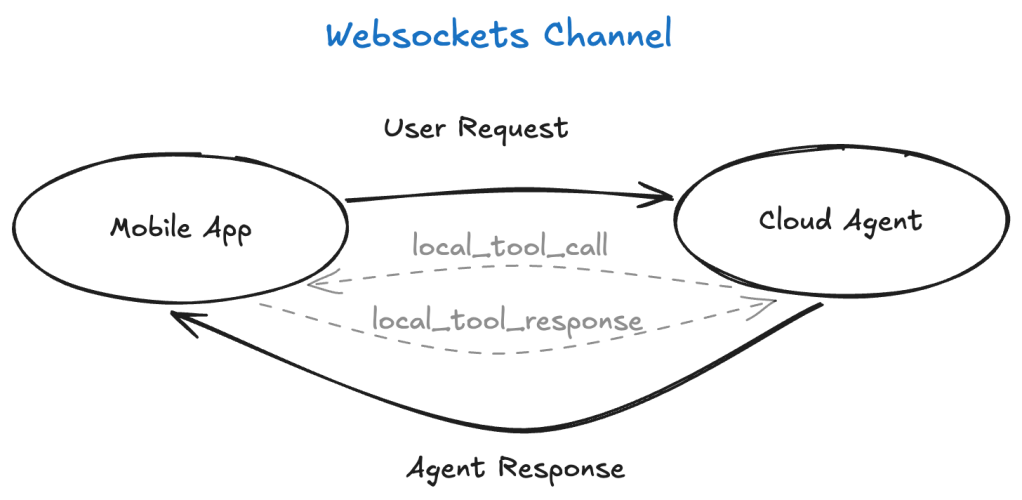
The breakthrough came when, instead of coding a LangChain alternative for iOS, I enabled WebSockets on my server agent to improve the UX.
And then it clicked: a WebSocket is a full-duplex channel. If I can stream assistant output to the phone in real time, I can also stream tool invocations to the phone—meaning the agent can call tools locally.
The server piece still mattered. Because the session is brokered by a server, I could issue short-lived JWTs to control access, use installation IDs to rate-limit clients, and enforce quotas.
That’s when “local tools” were born.
Agent Streemr
Once the local-tools paradigm clicked and started to feel like a repeatable pattern, I began asking: What other patterns can we build on top of this?
Along the way, I released the protocol that enables local tools—plus a TypeScript reference implementation and a few client libraries—as an Apache-2.0 open-source project.
Library: agent-streemr
Patterns enabled by local tools
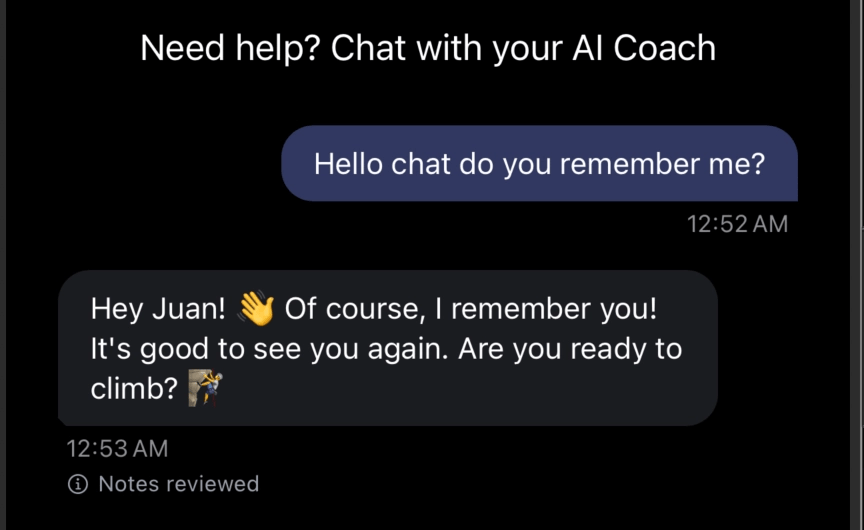
Local memory
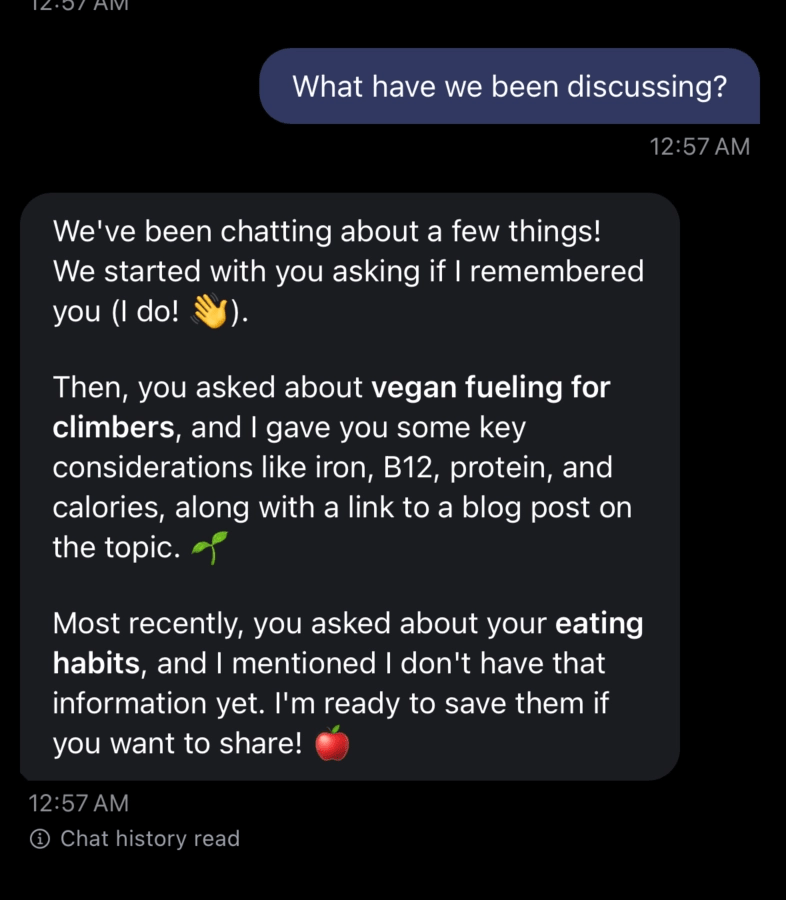
One classic agentic pattern is “long-term memory”: letting the agent accumulate and recall user context over time.
Local tools let me split memory along a boundary that feels much more natural on mobile:
- Short-term memory on the server: keep a compact working set (recent turns, current task state) so I don’t have to ship the entire conversation back and forth on every message.
- Long-term memory on the device: the most honest and user-aligned place for long-term memory is often the user’s own chat history on the phone.
This also keeps users in control. Instead of building bespoke “delete my data” flows so a user can purge their history from my databases, the user can simply delete the chat on their phone.
Local allowlist
With great power comes great responsibility—especially when your “tools” can touch privileged, high-context data.
I built Progression with user privacy as a top concern. My default posture is: only the crucial information should ever leave the phone, and ideally, it should only exist in motion (transit), not at rest on my servers.
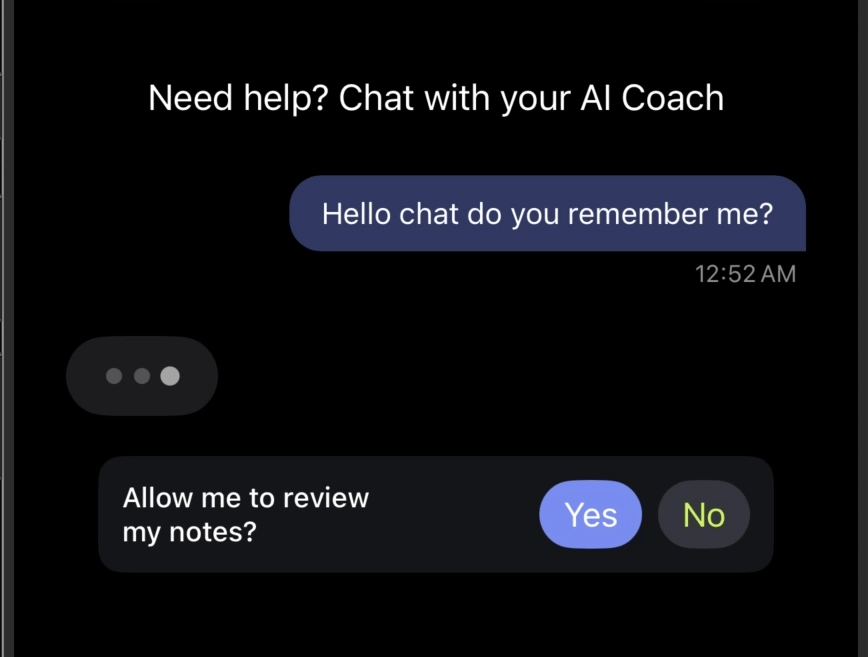
But privacy isn’t just about minimizing collection—it’s also about control. Local tools make it possible to put the user in the loop:
- The client can implement an allowlist of what the agent is permitted to access (e.g., location, photos, contacts, local DB tables, notification scheduling).
- The user can choose what they share and can revoke that access at any time.
- The agent can request capabilities, but the device is the enforcement point.
Local facts
Related to memory: many copilots (like ChatGPT and Claude) can remember “important facts” about a user’s preferences, recurring goals, personal constraints, and the little details that make the experience feel personalized.
Local tools let you do something similar without turning your servers into a personal-data warehouse.
Because the device can act as the source of truth, the client can:
- Extract and store a small set of facts (or “profile snippets”) locally.
- Share only the minimum required subset with the agent when needed.
- Capture nuances over time (preferences, tone, routines) to personalize the experience—while keeping the user in control.
Fluid UX
Not long ago, I learned about “fluid UX”. It’s a particularly hard bar to hit on mobile: responsiveness is top of mind, but the UI still tends to have a semi-rigid structure.
Local tools, combined with our various forms of memory, let us architect something more adaptive:
- The agent can understand intent and context (short-term working memory + local facts).
- The client can safely supply just-in-time data (allowlist-gated local tools).
- The UI can adapt to the user’s needs dynamically—unlocking a new level of personalization without turning every interaction into a slow server round-trip.
Forward-compatibility
One persistent pain of API-based server architectures is what happens the moment your API changes: you introduce versions, you slowly migrate clients, and you keep old versions alive for as long as your installed base hasn’t updated.
Local tools let you flip that around.
Instead of assuming a fixed client API forever, the agent can ask the phone what it can do:
- The agent queries the app for capabilities (which tools exist, which args they accept, and what response shapes they can return).
- The agent chooses a tool that the app understands, and sends only data it can parse.
That means you can keep iterating quickly—without constantly inventing brittle API versioning schemes or sacrificing the fast feedback loops we’ve all gotten used to in this agentic era.
These patterns are just the beginning of my exploration with this new paradigm. If you want to go deeper, you can read much more by visiting Agent Streemr.
And if any of this resonates, I’d love to collaborate—feel free to contribute to the project.
Looking ahead
Agents are still a greenfield. New patterns are showing up all the time, and I have a strong suspicion that building great agents is at least as much art as it is coding.
That’s a big part of why I’m building a platform to help me deliver better agents: Mobile Copilots—a multi-tenant platform for building and deploying agents using LangChain and Socket.io.
If you want to host your agents on the platform, please reach out to me on LinkedIn—or through the agent on my website: https://juancavallotti.com/ai-assistant.
Thanks for reading this far. And don’t hesitate to send your questions or comments!
 Juan Alberto López Cavallotti
Leave a comment